
Skip to content

Welcome to Defence Lab

Clear security. Real protection.

Some organizations are mapping their risk for the first time. Others already know what’s broken. Either way, we start where you are — not from a script — and tell you what we find in language you can act on.

One working conversation. No pitch, no deck.

  • executive-ready reporting
  • senior engineers only
  • 24/7 monitored coverage
  • no rip-and-replace
  • ISO / NIST-aligned delivery
  • SLA-backed response times

trusted by teams building and scaling globally.

  • FinTech
  • SaaS
  • Healthcare
  • Legal

Who we are & why it matters

a security team that builds its own tools.

We work with growing product companies across the United States, Canada and Europe, running security as an ongoing service rather than a series of projects. Where the tools we needed for that didn’t exist, we built them.

  • We build what we use

    Several of the tools we run on engagements were built in-house, because nothing on the market did the job the way the work needed. It means we aren’t limited to what a vendor happens to sell, and the tools change when the work does.

  • We test the ways in that get skipped

    Most testing points at the network and the applications. We also go through the front door of your offices, the inbox of your staff and the personal laptops nobody manages.

  • Your data stays where you put it

    The platforms we deploy run on your own infrastructure, so employee behaviour data and forensic evidence don’t leave your perimeter.

  • AI proposes, a person signs off

    We use AI where it saves real time, triaging findings and spotting anomalies, but a proposed result is never accepted automatically. In forensic work that is a requirement rather than a precaution.

We work to published methodology:

  • NIST CSF 2.0
  • PTES
  • NIST SP 800-115
  • OWASP WSTG
  • OWASP Wireless
  • MITRE ATT&CK

Where teams usually find us

three moments when security becomes a business decision.

Different triggers — one goal: reduce risk without slowing the business

/ 01Scaling product

You’re shipping faster than anyone can check

New code, new cloud services and new pipelines every week. Nothing has broken, but nobody can say with confidence what is exposed, and slowing your engineers down isn’t an option.

what changesChecks that keep pace with your releases instead of queueing in front of them.

secure sdlc & product security

/ 02Known gaps

Someone left in March, and you’re not certain their access is gone

There’s a report from last year with findings nobody closed, tools running that nobody has time to read, and a network that grew as the company grew without anyone ever designing it.

what changesOffboarding becomes a single action, and the open findings get an owner and a date.

security posture assessment
/ 03Incident pressure

Something has happened and you need control of it now

Files encrypted, an account signing in that shouldn’t be, or a laptop gone with access to production. The first job is an accurate picture of what is happening, from someone who has put one together before.

what changesYou get a clear account of what happened and what to do next, with the evidence preserved.

talk to someone now

Core services

what we actually do.

Six ways to work with us. Two are a one-off look at where you stand, one is a programme that keeps it moving, three run continuously.

/ 01

one-off engagement

security posture assessment

Find out where you actually stand

We look at what you have and tell you which gaps matter and which don’t, then give you a short list in the order things should be fixed.

  • what’s exposed now
  • what audits ask for
  • what to fix first
view details

/ 02

programme engagement

devshield — managed security program

Security with an owner every month

Instead of a project that ends, you get a monthly plan, someone whose job it is to close what is on it, and a report you can pass upward.

  • a monthly plan
  • fixes that get closed
  • reporting for your board
see how it works

/ 03

ongoing engagement

mdr / mxdr — 24/7 detection & response

Someone is watching, and wakes up when it matters

Most companies already collect the evidence of a break-in without anyone reading it, so we watch it instead and act when something is wrong.

  • 24/7 coverage
  • threat detection & containment
  • sla-backed response
explore mdr

/ 04

ongoing engagement

vciso (fractional)

A security lead without hiring one

You get the person who decides what matters first, answers the questions customers and investors ask, and keeps the written record, for a few days a month rather than a salary.

  • priorities and decisions
  • answers for customers
  • the written record
view scope

/ 05

one-off engagement

penetration testing

We try to break in, on purpose

Real attempts against your apps, cloud and network in the way someone hostile would, followed by a list of what actually worked, worst first.

  • apps, cloud and network
  • findings engineers can use
  • re-test after fixes
view options

/ 06

ongoing engagement

human risk management

The part where somebody clicks the link

Most break-ins start with a person rather than a server, so we find who is vulnerable, train them, and show whether the risk is going down.

  • real phishing tests
  • training that follows
  • risk you can measure
see program

Products

products built around real security questions.

phishattack

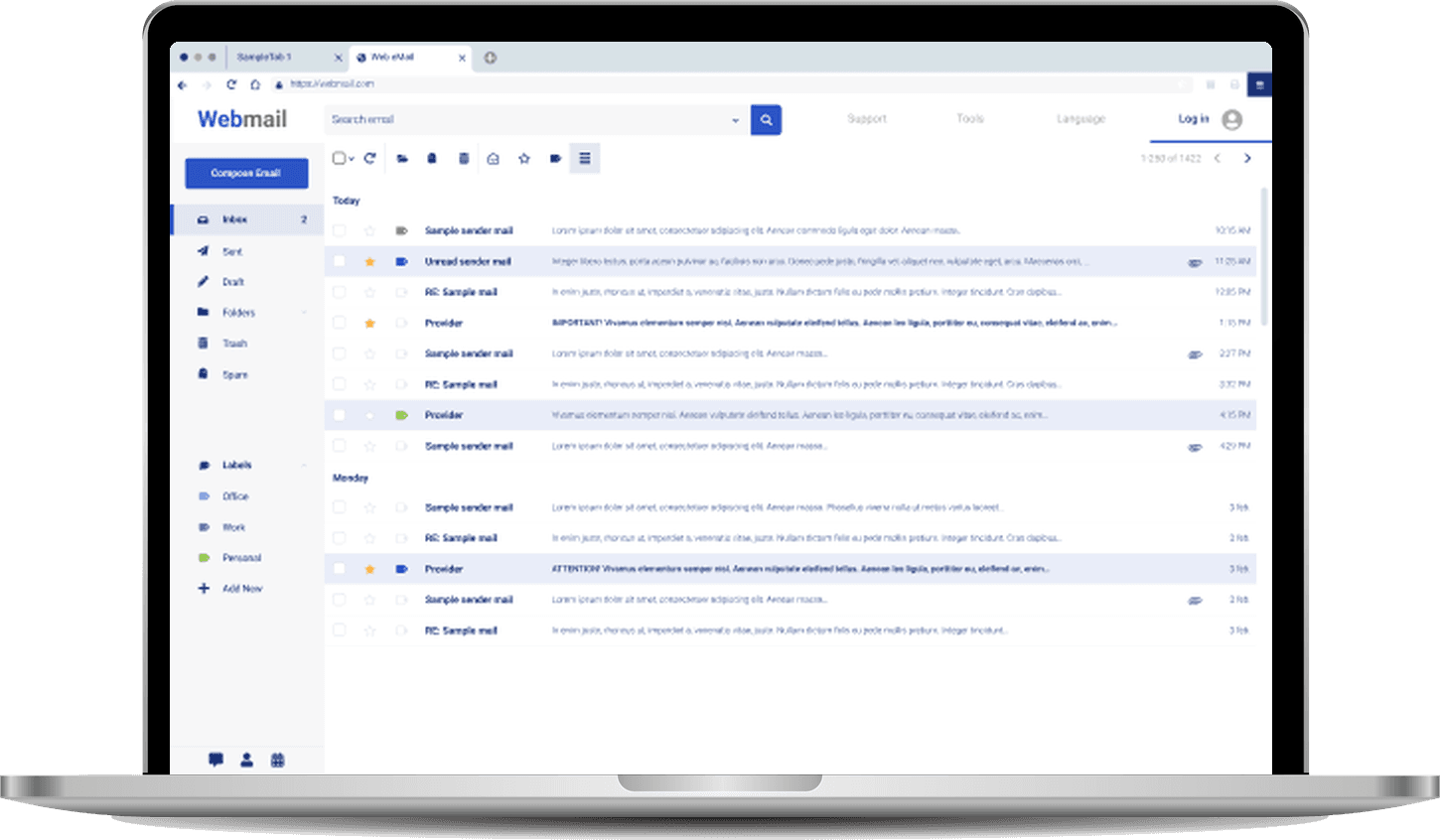
Phishing that actually gets past MFA — real session capture, not a lookalike page. It answers what awareness courses can’t: could someone walk in with a stolen login today?

explore PhishAttack (coming soon)
Webmail inbox on a laptop where simulated phishing messages from “Provider” sit among ordinary mail, some flagged IMPORTANT or ATTENTION

Case studies

six things we built, and what they changed.

Real engagements, with clients anonymised. Each one starts with the situation rather than the technology; open one to see what we did about it.

  1. / 01Outgrown setup

    A whole company on a shop-bought router

    Everything worked well enough — email arrived, files opened, Wi-Fi connected. The company had grown from a handful of people into a full operation, and the network had grown with it one device at a time, around a router bought from an electronics shop.

    one flat network, one device, no record

    what we did — A whole company on a shop-bought router

    What that meant

    Everything sat on one flat network, so the printer, the cameras, the laptops, personal phones and the systems holding company data could all reach each other. Nothing inspected what was leaving the building and nothing recorded who had connected or when, and updates happened whenever somebody remembered.

    What we built

    We replaced the platform rather than adding security on top of it, in stages, so the business kept working throughout. The office was separated into distinct networks, a redundant pair of firewalls replaced the single device, and every event was sent to central logging. Every user network was then left with no direct route to the internet at all — traffic runs through encrypted tunnels to exit infrastructure we operate in three countries, where controls are applied centrally.

    What changed

    When the company opened a second office it joined the same infrastructure rather than being designed from scratch, so the first project became the template for the ones after it.

    What this means for you.

    If your network was never designed, the useful first step is finding out what you actually have rather than buying a firewall.

  2. / 02Outgrown setup

    Segmentation nobody notices

    A large site with cameras, door controllers, printers, meeting-room screens, corporate laptops and a constant flow of visitors. Everyone agreed these shouldn't share one network.

    12 networks · still in place

    what we did — Segmentation nobody notices

    What that meant

    Segmentation is one of the most commonly abandoned security projects, because separating things properly tends to break what people use every day: printers disappear from the list, screen sharing in the meeting room stops working, and within a fortnight the whole thing is quietly reversed.

    What we built

    Twelve distinct networks, with traffic between them denied unless there was a reason for it — then the daily things made to work across those boundaries deliberately and narrowly. Printing worked but scanning didn't: scanning doesn't use the printing ports, and this printer model didn't use the standard scanning ports either. We identified the two non-standard ports it actually needed and opened exactly those two.

    What changed

    Staff print, scan and share their screen exactly as before, and the segmentation is still in place months later — largely because it never became the reason somebody couldn't do their job.

    What this means for you.

    If a previous attempt at separation was rolled back, that usually says less about the idea than about how much of the work is keeping things usable afterwards.

  3. / 03Known gaps

    Wi-Fi that knows who you are

    One shared corporate Wi-Fi password — known by every current employee, every former employee, every contractor who had ever visited, and the personal phones of all of them. Changing it meant disrupting the whole company, so it never was.

    offboarding: one action

    what we did — Wi-Fi that knows who you are

    What that meant

    Access couldn't be removed when someone left, and there was no way to answer who had been on the network on a given day, because the network could only record that a device had connected rather than which person was using it.

    What we built

    Wi-Fi authentication moved to the identity system the company already had, so joining the wireless network uses the same account as email. The same system authenticates remote access, with a second factor available. We also gave their IT lead and security lead their own read-only administrative accounts, so they can inspect any configuration, policy or log at any time without being able to change anything.

    What changed

    Offboarding became a single action, and every connection is now attributable to a named account rather than a shared secret, which is what an auditor asks for and what an investigation depends on. The client also no longer depends on us to see their own environment.

    What this means for you.

    If someone left last month, can you prove their access is gone? If the answer involves changing a password everybody uses, that's the gap.

  4. / 04Compliance

    Guest Wi-Fi that survives an audit

    A busy site with constant visitor traffic, and guest Wi-Fi that was either open enough to be a risk or awkward enough that reception ended up reading the password aloud across the lobby.

    consent recorded · 30-day retention

    what we did — Guest Wi-Fi that survives an audit

    What that meant

    The more serious exposure was legal rather than technical. Under European data protection rules, offering guest Wi-Fi means processing personal data, and there was no recorded consent, no stated purpose, no retention position and no record of who had connected.

    What we built

    A guest network where the compliance position comes first. Visitors see clear terms in both English and Spanish and must actively agree, then register with an email address. The notice states what is collected, why, that it is kept for 30 days and that it is not shared. Access lasts seven days per device, and returning guests inside that week aren't asked again. Certificates renew themselves so the portal never warns visitors the connection is untrusted.

    What changed

    The client can answer every question a data protection review asks: consent is explicit and recorded, the purpose is stated, retention is defined and each session is attributable. It also costs the front desk nothing, since nobody has to read a password aloud any more.

    What this means for you.

    Guest Wi-Fi is usually the cheapest compliance gap to close and one of the most commonly ignored, which often makes it the fastest visible result in a wider programme.

  5. / 05Resilience

    The quiet month when nothing happened

    A smaller satellite office with no technical staff on site — the kind of location where a problem is discovered by people being unable to work, and getting someone there takes half a day.

    0 users disconnected

    what we did — The quiet month when nothing happened

    What that meant

    A known software fault in the firewall was leaking memory, roughly 30 to 40 megabytes a day. After about 25 days memory use crossed 88 percent and the device entered a protective mode: it stops accepting new connections and passes traffic without inspection. The office becomes unreliable and less protected at the same time, with no obvious outward sign.

    What we built

    A properly configured redundant pair, with the second firewall fully synchronised rather than merely present. It was sitting at 43 percent, healthy, with an identical configuration, and it carried the office on 1,310 active connections and 380 Mbps while we worked — in daylight, instead of at three in the morning. Then we removed the problem permanently rather than waiting for the manufacturer's fix, with automatic responses built into the device itself.

    What changed

    Not one user was disconnected: remote sessions stayed up, Wi-Fi kept working and nobody raised a ticket, and the only visible effect was 20 to 30 seconds in which the administrative interface was unavailable. A fault that would have cost this site a morning every month stopped being a recurring one.

    What this means for you.

    Equipment usually degrades rather than failing outright, so protecting against it needs a second device that is genuinely ready, monitoring that notices a trend rather than an outage, and a willingness to automate around a known fault.

  6. / 06Expansion

    One console, every site

    A single large site that had grown into 24 switches and around two dozen access points across several buildings, with a group plan to open further offices internationally.

    24 switches · one console

    what we did — One console, every site

    What that meant

    Every change meant touching equipment individually, and every new location meant designing it again, sending an experienced engineer, and ending up with a site that differed slightly from the others in ways nobody documented. The cost of that inconsistency is easy to miss: because no two sites are quite the same, each problem has to be worked out from scratch.

    What we built

    One management platform, hosted centrally, running the entire estate — all twenty-four switches, the access points, five wireless networks and twelve network segments from one place. Configuration is held as templates, with the site-specific details kept separately as variables. We also documented the environment as plain-language documents a new IT hire or a different provider could actually use.

    What changed

    Changes are made centrally and consistently, without travelling to a site. For the group's expansion the method is prepared: equipment is registered centrally before it ships, then finds its own configuration when powered on — a location operational within minutes, with no engineer on site.

    What this means for you.

    If you plan to open more locations, the decisions that shape the cost are made at the first site rather than the third, because a site built from a template costs a fraction of one designed from scratch.

What working with us actually gives you

the difference is in how the work gets done.

  • The same people, start to finish

    The engineers who scope your engagement are the ones who deliver it. Your CISO keeps a direct line to the technical lead, so the people making the recommendations are the people carrying them out — no handoff, no re-explaining your environment to a new team.

  • We build the tooling the work needs

    Where off-the-shelf tools stop short, we write our own — internal automation, testing harnesses, and purpose-built platforms. The assessment adapts to your architecture instead of forcing your architecture through a generic scanner.

  • Access you can audit

    Every credential and permission is scoped to the work, logged while it’s in use, and revoked when the engagement ends. You get a written record of exactly what was touched, and when. Nothing lingers.

  • Reports built to act on

    Findings ranked by real business impact, with reproduction steps precise enough for your engineers and a summary clear enough for your board. A document that drives fixes, not a 200-page PDF that sits in a drive.

Process

security built around how your business actually works.

one team across all five stages

  1. define scope & goals

    What matters, and who decides

    We agree what the business actually needs protected, what is off limits, and how we will know it worked. Ownership gets written down here rather than assumed.

  2. assess & prioritise risk

    Where you stand today

    A baseline of what you have and what is exposed, then a short list ordered by what an attacker would reach first — not everything at once.

  3. implement & enable controls

    Fixing it without breaking the work

    Controls go in in stages, alongside what is already running, because what matters is not whether it is secure on day one but whether it is still there a year later.

  4. monitor & respond

    Someone watching, and someone answering

    These are two different jobs: monitoring runs continuously, and when something is wrong a person acts on it with enough context to decide, rather than leaving a queue to triage later.

  5. report & improve

    Proof it is working, and what changed

    Progress you can put in front of a board or an auditor — and the fixes go back into hardening, so the same fault doesn't return on a schedule.

Trust & governance

every action is traceable, every access is time-bound, and nothing happens behind closed doors.

Access is limited to what’s needed — and ends when the work is done.

  • You can see everything we see

    Your own IT and security leads get read-only accounts, so you never have to ask us what is configured.

  • Written so someone else could take over

    Documentation written plainly enough that a new hire or a different provider could actually use it.

  • Your data stays where you put it

    Our platforms run on your own infrastructure, so employee and evidence data doesn’t leave your perimeter unless you allow it.

Where to start

Not sure which part you need?

Tell us what’s happening and we’ll say which of it is urgent, which can wait, and what it would take. If the answer is “you’re fine for now”, we’ll say that too.